
Every invoice matched, approved by amount, and in your books.
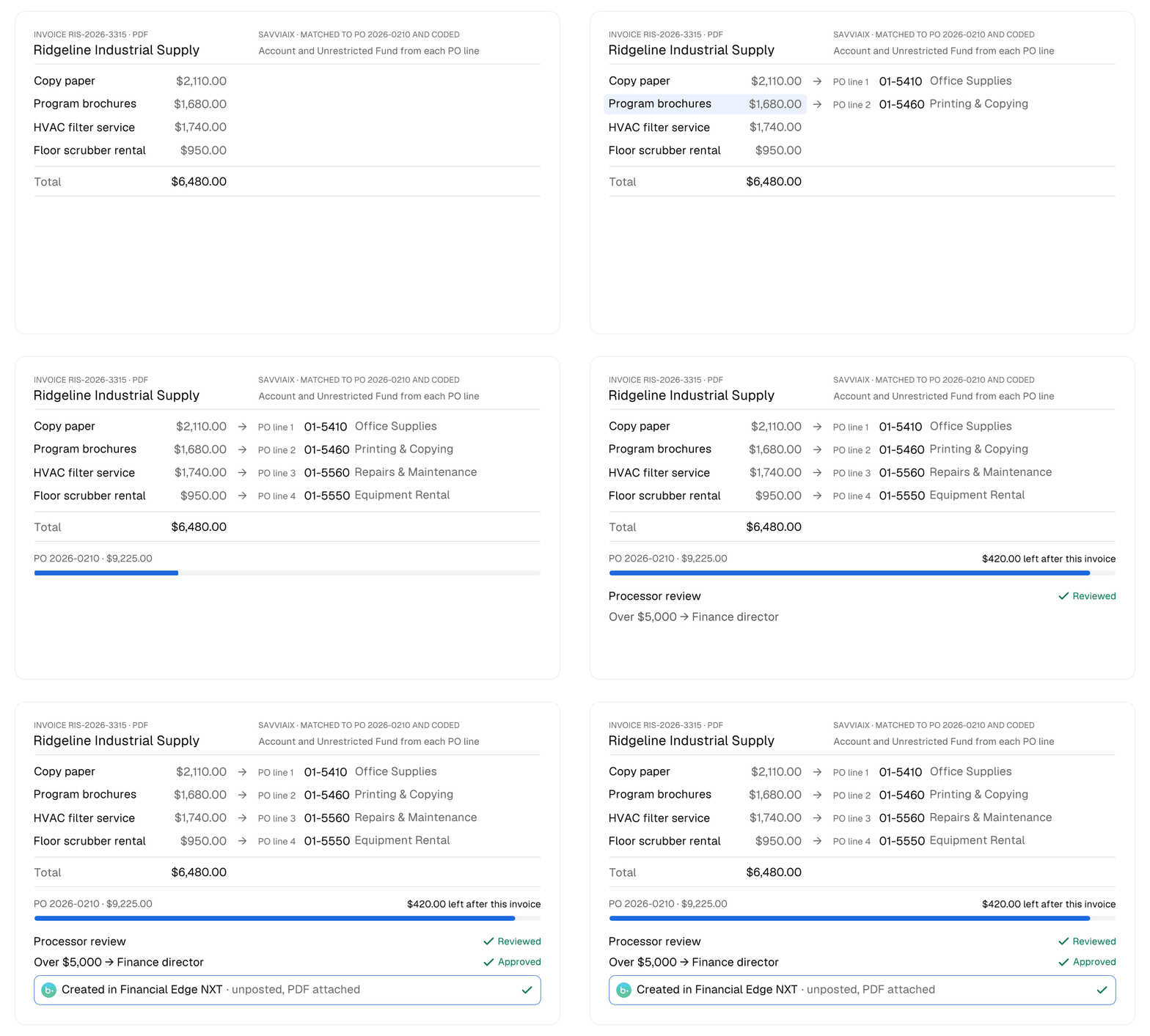
SavviAIX reads your vendor invoices, matches each one to its purchase order, and routes it for approval by amount. Approved invoices arrive in your accounting system as bills waiting to be paid.
SavviAIX does the keying. Your team keeps the books.
SavviAIX
Invoice arrives
Email, Google Drive, OneDrive or upload
Matched to the PO
Line by line, by number and vendor
Processor review
A person checks every invoice
Approval
By the group set for that dollar amount
Your accounting system
Bill created
Linked to its purchase order
Your team pays
The same as today
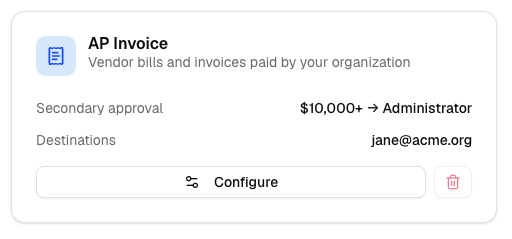
- Approval thresholds you set
- A processor reviews every invoice first. Set your dollar thresholds and the approval group for each, and every invoice goes to the group its amount calls for.
- Checked before it reaches your books
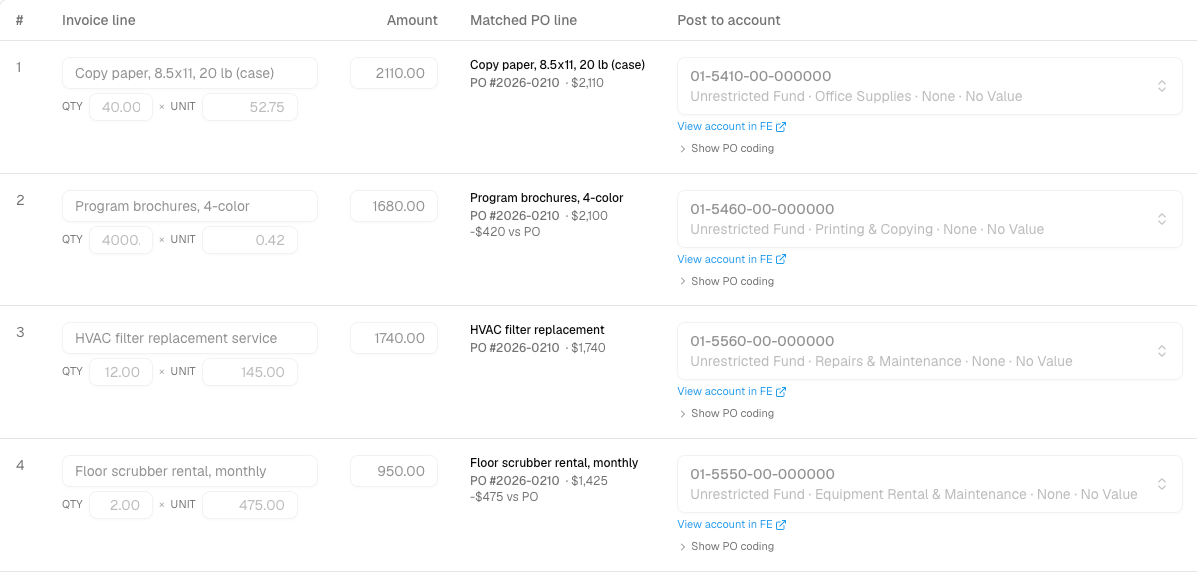
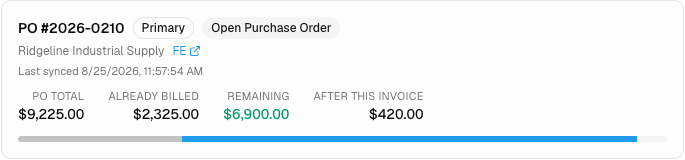
- Each invoice is matched to its purchase order by number and vendor, and billing past what the PO has left is flagged. Likely duplicates are caught before anything posts.
- Your team still pays the bills
- SavviAIX creates the bill in your accounting system, linked to its purchase order. Payment stays with your staff.
- Coded from the purchase order line
- Account, fund and project come from the approved purchase order line, exactly as entered. Restricted dollars stay in the fund they belong to.
- Unposted, with the PDF attached
- Invoices arrive in your accounting system unposted with the source PDF attached, and SavviAIX creates no vendors, accounts or journal entries.
- Closed periods and keyed invoices
- A closed fiscal period is caught before the invoice goes to your accounting system, and invoices keyed straight into it count against the PO.
Closing files, checked against your own checklist.
Scan a microloan closing file as one stack. SavviAIX splits it into its documents, labels each one, and checks the file against the checklist your team writes: notes signed, a guaranty for every guarantor, a credit report for every person on the loan, terms that agree from one document to the next.
Every check points to the page it read. Nothing is approved until the required items pass. Approved files go to your storage, one folder per loan.
Example checklist
Microloan closing file
-
Checking Pass
Promissory note signed
Promissory note, p. 4
-
Checking Pass
Loan number on the note matches the loan
Promissory note, p. 1
-
Checking Pass
A guaranty for every guarantor
Guaranty, p. 1 · 2 of 2
-
Checking Not found
A credit report for every person on the loan
1 of 2 found
-
Checking Not applicable
Collateral documents
No collateral on this loan
Approval held until the required items pass.
Closing file scanned
One stack, documents in any order
Split and labelled
Note, guaranty, insurance, credit report
Checked against your checklist
Each check cites the page it read
Reviewer approves
Only once the required items pass
Filed
One folder per loan, in your storage
Your loans and your ledger, in one place you control.
Most CDFIs run a servicing system, an accounting system, a document store and the spreadsheets that stitch them together. Reports wait on an export, month-end means retyping, and board packages are put together by hand.
Savvior builds the layer between them. Your servicing system is mirrored on a schedule into a database you control, with your general ledger beside it. Staff run their own reports, journal entries come out of loan activity already balanced, and investors see their own positions in a portal. Your systems of record stay as they are.
What you run today
Loan servicing
The system you service loans in
Accounting
Your general ledger
Documents and lists
Your shared drives
Spreadsheets
Exports and workarounds
A warehouse you control
Mirrored on a schedule and checked against the source, with month-end snapshots
What your staff get
Reports
Run by staff, saved and scheduled
Journal entries
From loan activity, balanced and checked
Investor portal
Each party sees only its own
Statements and letters
From the same figures
We start with the warehouse, add the ledger, then take on one manual process at a time, checking every figure against the one your staff worked out by hand. Journal entries post straight to your accounting system.
- SOC 2 Type II
- Independently audited.
- No training on your data
- A contract term with every AI provider we use.
- On the Blackbaud Marketplace
- Approve the app and connect.
- Unlimited users
- Every approver and signer, at no extra cost.
- Published pricing
- From $49 a month. See every plan
See it on your own invoices.
Bring a few invoices, your approval thresholds and the name of your accounting system. We’ll show you how they land in it.
Prefer to try it yourself? Start a free trial
Calendar not loading? Open it in a new tab